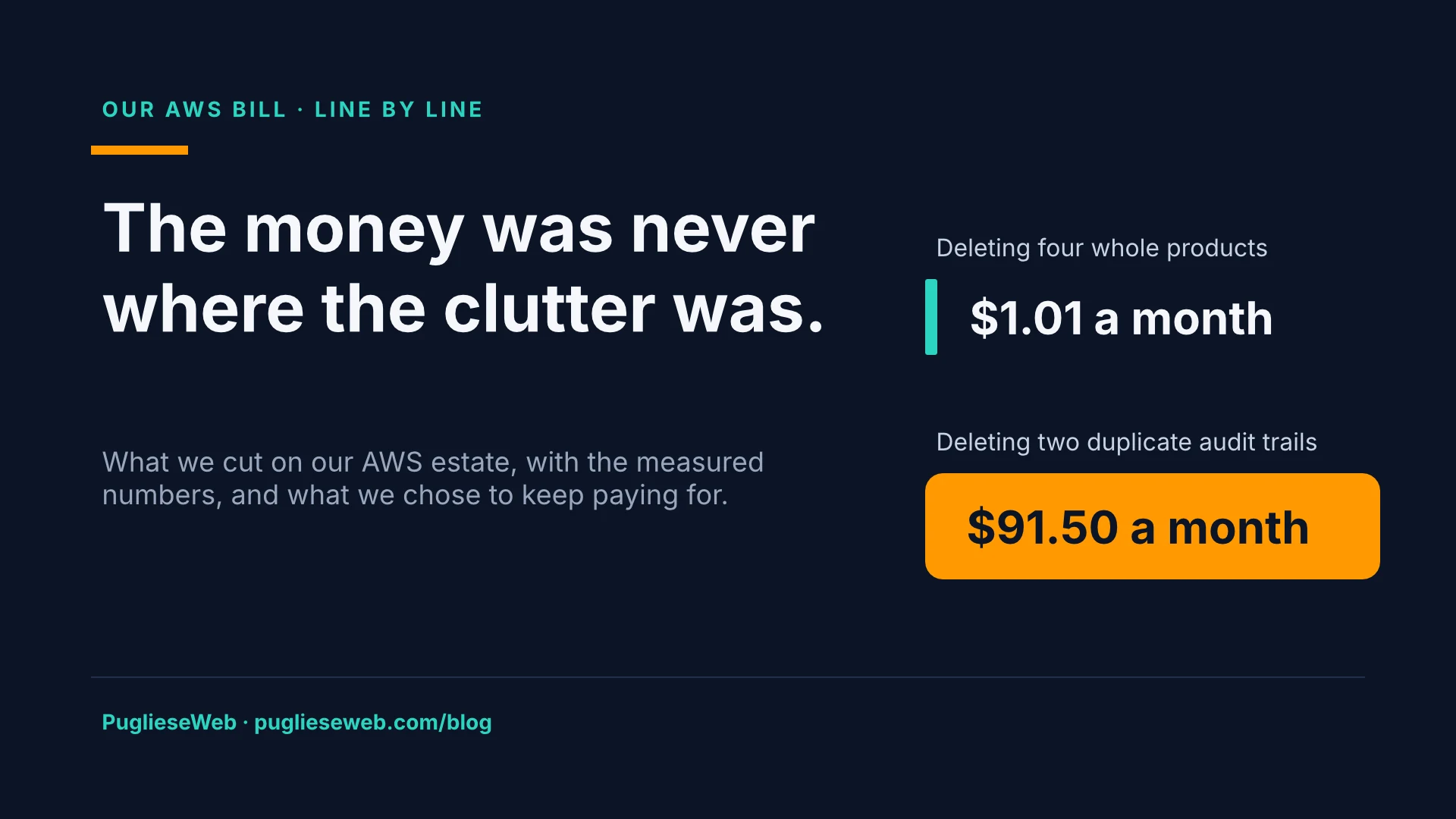
Deleting four whole products from our AWS accounts saved about $1 a month. Deleting two audit trails nobody remembered creating saved about $91.
In August our AWS usage was $190.86. In June and July it had been $88 and $103, and all of it was covered by credits. In August the credits ran out: $1.96 of credit against $190.86 of usage. Usage had doubled in two months, and nothing told us. No alarm fired, because none existed. A person reading the invoice found it.
That is the honest starting point for this article. We build and run our own products on AWS in London, and we advise other businesses on how to run theirs. So we went through our own bill line by line, the way we would for a client. This is what we found, what we cut, and the two places we decided to spend more.
1. Make the bill tell you, before you cut anything
Cutting comes second. The first job is making sure the next surprise does not take a month to reach you.
- Cost Anomaly Detection in every account, with a daily email whenever a change would add $10 or more.
- An hourly cost and usage export (CUR 2.0), so a question about spend is a query, not an afternoon in the console.
- A cost lint in CI. A template is now refused if it adds a log group with no retention, a Lambda function inside a VPC, or provisioned concurrency. All three are fine choices when someone means them. All three cost money every hour when nobody does.
None of this saved a penny on the day it went in. It is the reason everything below was found in hours, not at the end of the month.
2. We were paying three times to record the same events
AWS Control Tower already keeps an organisation-wide CloudTrail trail of management events, and that first copy is free. Over time two more trails had appeared: an undocumented one called management-events, and a product audit trail that also recorded management events. Each extra copy is billed at $2.00 per 100,000 events.
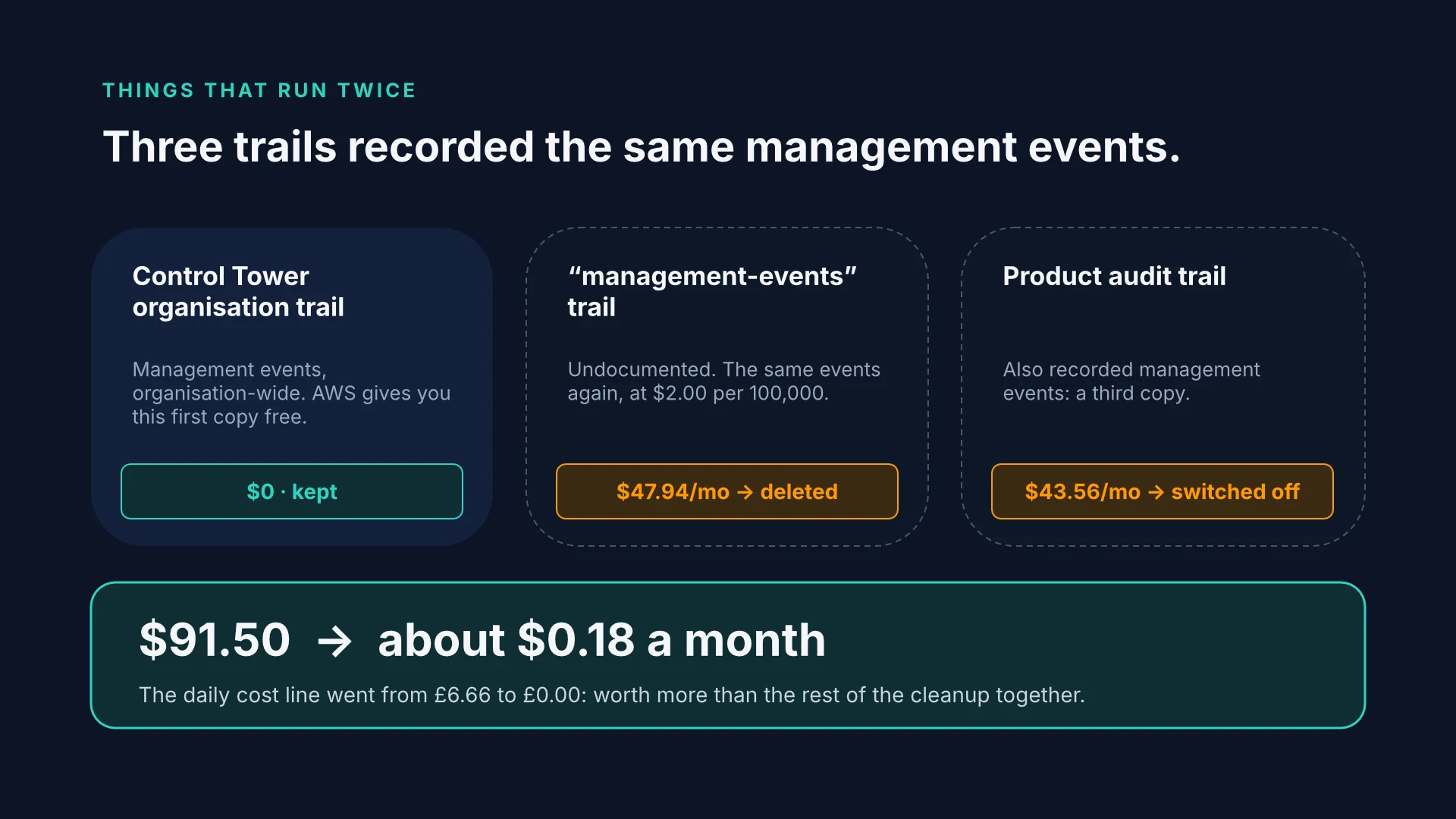
We deleted the undocumented trail and turned management events off on the product trail. CloudTrail went from $91.50 a month to about $0.18, and the daily cost line went from £6.66 to £0.00. While we were there, we also dropped a move to Glacier storage that cost more than it saved at an average object size of 71.8 KB, and added an expiry for old object versions.
This one change was worth more than everything else in the cleanup put together.
3. Clutter is not cost
The same cleanup removed everything that was idle:
| What | Saved a month |
|---|---|
| An Elastic IP nobody used (744 billed idle hours in August) | $3.72 |
| A t2.micro in São Paulo, stopped since 2019, still paying for its disk (about $127 burned in total) | $1.52 |
| A Route 53 health check that no record referenced | $1.00 |
| 9 alarms, 8 of them watching a table that no longer existed | $0.90 |
| A Secrets Manager secret nothing read | $0.40 |
| 7 buckets, 3 tables, 29 log groups, a certificate | $0.03 |
We also decommissioned four whole product families. Their share of the bill was about $1.01 a month. We removed them for blast radius and clarity, which were good reasons, but money was not one of them.
The lesson we now apply first on any bill: the money is in things that run all the time, or run twice. Things that merely exist are rarely where it goes.
4. The number we priced on was ten times wrong
Our AI assistant answers questions for businesses. When we set its prices, we used an estimate of £0.0022 per reply. Then we measured it from the ledger: £0.023 per reply, more than ten times higher. At that rate the top tier would have lost money at its own ceiling.
We did not fix that by guessing again. Every plan’s ceiling is now derived from measured cost (30% of the price, a 70% margin target), and the whole platform has a ceiling of its own: £250 a month and £25 a day across every customer together. Before that, the only limit was an AWS budget alert that sent an email and stopped nothing.
5. Ninety-two per cent of the AI spend was work we gave ourselves
When we split the AI ledger by who asked for the work, the answer was uncomfortable. 92% of the money went on work the system scheduled itself: the nightly re-reading of customer websites and the re-writing of prepared answers. Customers asking questions was the small part.
So we changed what the night does:
- An answer is rewritten only when its source page changed. An unchanged nightly read of a 14-page site now costs about £0.04, against £1.86 the night before the change.
- No prompt caching on those calls. Caching pays when the same long prompt is read again. Each of these prompts carried its own question’s passages, so no two were alike: every call wrote a cache entry at 1.25 times the normal price, and almost nothing read one back. In one sample, 37 calls wrote 135,920 cached tokens and read 7,042. Without the cache, each call is about 20% cheaper and the answers are identical.
- Content work asks the spend limit before it spends, not after.
- The cheapest model that can do the job. The passage our chat uses for search is now written by Claude Haiku 4.5 instead of Sonnet 4.5. Search calls were 24% of the unit cost of a reply.
- One small fix for one small leak. A badge in the console made one platform call on every page load. It now makes one per tab, cached for ten minutes.
6. CI: first the minutes, then a server
We have written about this in detail, so here are just the numbers. GitHub bills every job rounded up to a whole minute, and our pipeline was full of jobs that ran for seconds. The first article covers the redesign; the second covers moving check jobs onto our own server.
September cost 98,156 billed minutes, $560 net. From 1 to 11 October we used 14,753 minutes, $68.52, on course for about $230 for the month. The server that took over the checks costs €138.99 a month, which is the first of the two places we chose to spend more.
7. Voice: stop paying for the night
Our AI receptionist answers phone calls. A call needs a server that holds an audio stream open for minutes, so this part of the estate cannot scale to zero between requests the way a Lambda function does. Here the cost is the hours a server stays up, not the requests.
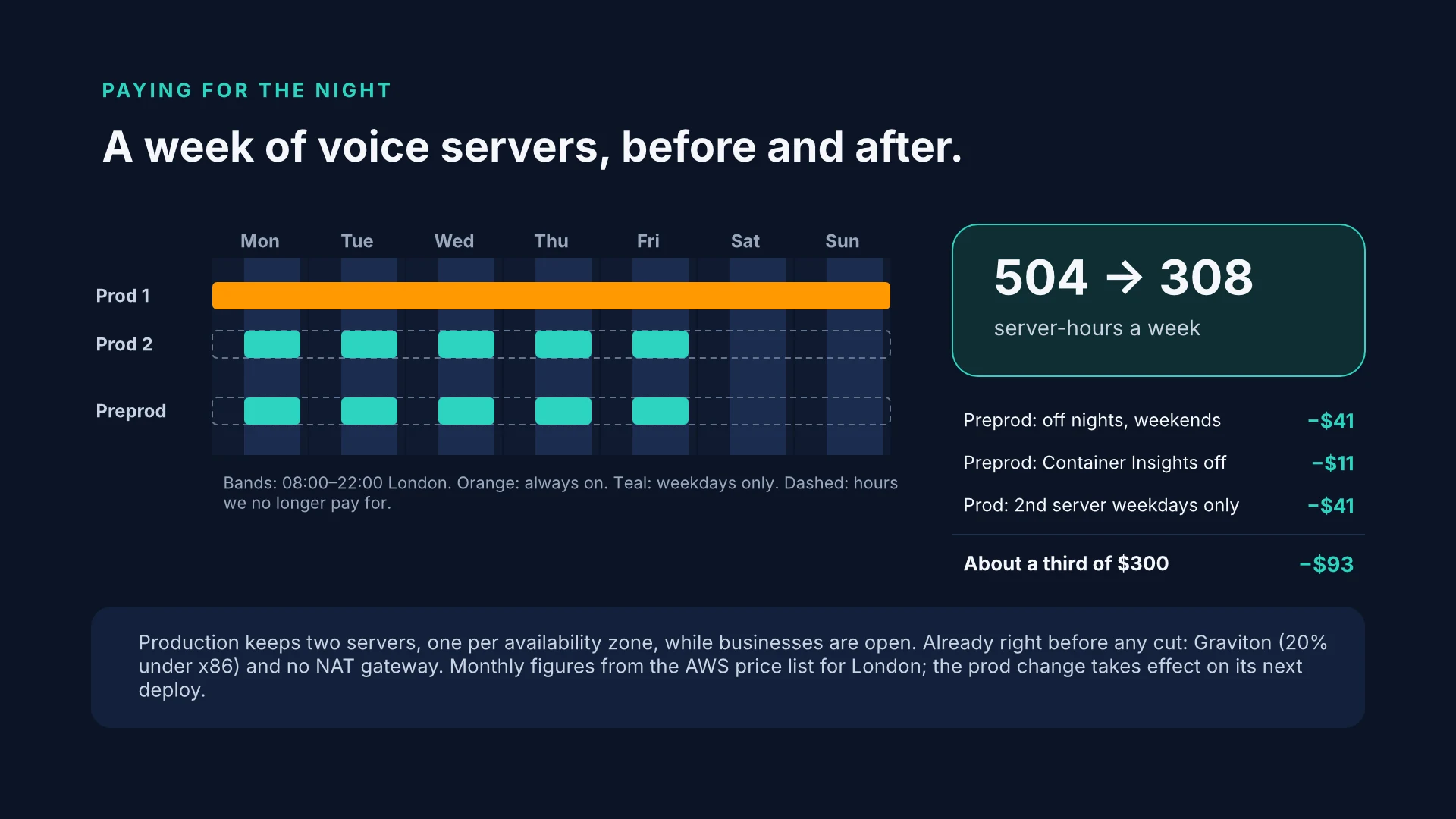
The call brain is kept warm only from 08:00 to 22:00. In production that costs about $16.88 a month. Preprod used to keep it warm too, for $6.63 a month; it now starts on demand, for nothing.
The voice servers moved to AWS Fargate this week, and the move was made for capacity, not for cost. We sized the target at 100 calls at once, and the alternative would have been five rented servers at about £151 a month, which still could not reach that number because of the provider’s account limit. Fargate’s estimate was about £75 a month idle. Then we priced what we had actually deployed, line by line, from the AWS price list for London:
| Monthly, idle | Production | Preprod |
|---|---|---|
| Fargate, Graviton, 2 vCPU / 4 GB per task | $133 (2 tasks) | $66 (1 task) |
| Application Load Balancer | $20 | $20 |
| Public IPv4 addresses, $3.65 each | $15 (4) | $11 (3) |
| Container Insights metrics | $11 | $11 |
| Our own metrics | $5 | $6 |
| Total | ≈ $185 | ≈ $115 |
About $300 a month with almost no calls. An estimate leaves out the small lines, and in an idle month the small lines are most of the bill.
What was already right, and stayed:
- Graviton. The same task on x86 costs $0.1136 an hour instead of $0.0909, 20% more.
- No NAT gateway. The tasks sit in public subnets with their own address, locked to outbound HTTPS. A NAT gateway would cost more on its own than all four public addresses together.
- DynamoDB on demand, logs kept 30 days, Container Insights’ performance logs kept one day.
What we changed, the day after go-live:
- Preprod runs no voice server at night or at weekends, and one on weekdays from 08:00 to 22:00 London time. This uses the scheduled floor our autoscaling already supported, so no code changed, only two settings. About $41 a month.
- Container Insights is off in preprod. Autoscaling reads our own call metric, not Container Insights, and preprod did not need the rest. About $11 a month.
- Production drops to one server at night and at weekends, and keeps two on weekdays from 08:00 to 22:00. The setting is in place and takes effect on the next production deploy. About $41 a month.
Together that is about $93 of the $300, roughly a third, without touching how a call is handled.
8. The two places we chose to spend more
A second voice server in production while businesses are open. On weekdays from 08:00 to 22:00, production runs two tasks, one in each availability zone. With only one task, a failure would drop the calls on it, and new callers would reach the fallback until a replacement started, a minute or two later. At night and at weekends we accept that risk to save about $41 a month. In the hours that matter most, we pay for the second server.
Our own CI server. €138.99 a month, against a minutes bill that had reached $560.
9. What we are deliberately not doing yet
- Not shrinking the voice tasks. At idle they use 1% of their CPU and about 150 MB of their 4 GB, which makes them look oversized. But idle tells you nothing about a call. A load test will measure what a call actually uses, and if a 1 vCPU task holds three or four calls, halving the task halves the always-on floor.
- Not buying a Savings Plan. A one-year plan takes 21% off Fargate, and a three-year plan 46%. But a plan locks in an hourly spend, and we buy it only once the task size and the floor are settled.
- CI servers that disappear when nobody is developing. The two servers cost about €175 a month even on a quiet weekend. We have decided to delete them when idle and recreate them on demand. That is decided, not done.
A checklist for your own bill
- Turn on anomaly detection before you cut anything. A surprise should take a day to reach you, not a month.
- Look for things that run twice. Duplicate trails, duplicate logs, a scheduled job doing work someone else already did.
- Look for things that run when nobody needs them. Preprod at night, warm functions at 3 a.m., jobs that rewrite unchanged data.
- Price what you deployed, not what you planned. Load balancers, public IPv4 addresses and metrics are small lines, and in a quiet month they are most of the bill.
- Write down what you are choosing to pay for, and why. Then the next person who reads the bill does not “save” your second availability zone.
If you would like us to read your bill the same way, get in touch.